

Easy Expired Domains

Thirteen sources. 55M+ domains.

Every domain listing site has its own list, with its own idea of to show you about a domain. Easy Expired Domains gathers them, puts Majestic, Moz, DomDetailer, Archive data and more for every domain, and scores the lot out of 100 so one sorting is easier than ever.

  • Auctions
  • Closeouts
  • BIN
  • Expiring
  • Expired
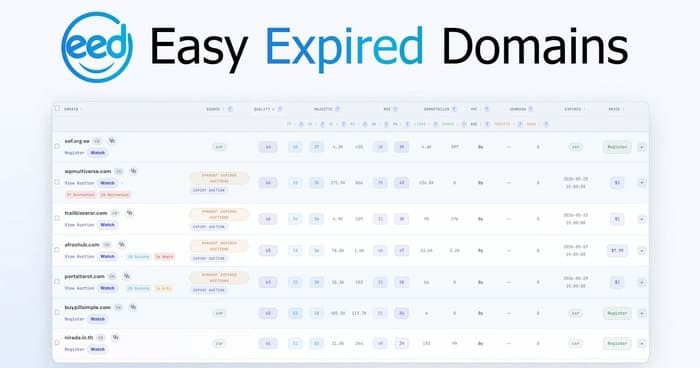
Rapid market search Refreshed through the day The Easy Expired Domains interface showing marketplace results with quality, authority, age, pricing and expiry data.
Providers
13 inventories in one index
Listing types
5 separate lists to search
Filters
47 across 6 groups

Five lists, in one

Five types of domain listings covered

Easy Expired Domains covers 5 different domain types, each with their own pros and cons. Having access to all types of domains makes finding the best domains in any niche nuch easier. Choosing the right list is the first real decision of any search, because it changes both what you find and what it costs.

Auctions

Open bidding, with a clock

Live auctions where the price is decided by whoever wants the name most. The highest quality inventory tends to surface here, and so does the most competition.

A bid count tells you how many people reached the same conclusion you did.

Closeouts

Unsold, at a falling fixed price

Auctions that ended without a winning bid. No bidding and no competition on price, just a fixed figure that drops until somebody takes it. Patient research genuinely pays here.

Most closeouts went unsold for a reason. The metrics are how you find the ones that did not.

BIN

Buy it now, at a set price

Listed at a stated price and available immediately. Usually an investor selling from their own portfolio rather than anything coming out of the expiry cycle.

You are paying somebody else’s margin for the convenience of not waiting.

Expiring

Not yet available, but coming

Names whose registration is lapsing. You cannot buy them yet, which is precisely the value. It buys you time to research properly before anyone is bidding.

Plenty get renewed at the last moment and never become available at all.

Expired

Already dropped

Names that completed the cycle and returned to the pool. Far less competition and far lower cost, but an enormous haystack. This is where filtering stops being a convenience and becomes the whole job.

Volume is the problem here, not scarcity.

Where the inventory comes from

Thirteen providers, gathered and kept current

Several of these supply more than one kind of listing, which is why a provider name and a listing type are two separate filters rather than one. Everything is refreshed through the day so the pricing you sort on is current.

  • Afternic
  • Atom
  • DropCatch
  • Dynadot
  • Gname
  • GoDaddy
  • Namecheap
  • NameSilo
  • Sav
  • Sedo
  • SnapNames
  • Spaceship
  • Expired Import

Provider coverage changes as the market does. The live product is always the current list.

A real search, sorted by quality

Everything you need to triage, before you click anything

This is an actual captured result set. Each row already carries its Majestic, Moz, DomDetailer and SemRush figures already attached. No hovering, no opening tabs. Expand the a domain to see the full details pane that sits one click beneath it.

Sorted by quality score, high to low
Example Easy Expired Domains search results with quality, Majestic, Moz, DomDetailer, SemRush, age, expiry and price
Domain Source QS TF CF BL RD DA PA Age Rank Expires Price
ksbha.org Gname Auctions Auction / Bid 85 39 27 2.5K 649 42 42 26y 3.1M 2026-08-18 $81
rssbandit.org Sav Pending Delete Pending delete 84 49 40 11.3K 974 51 50 23y 22.9M 2026-08-30 $11.64
aboututila.com DropCatch Auctions Private seller 84 49 34 4.2K 1.1K 47 45 22y 16.6M 2026-08-17 At auction
imancosmetics.com Gname Buy Now Buy now 84 46 32 4.5K 593 54 47 28y 0 2027-01-21 $4,000

A genuine captured search. Listings refresh through the day and auctions move minute to minute, so prices, closing times and availability will have changed since this capture.

See it properly

The launch walkthrough

A tour of the product in context: picking a listing type, setting filters, sorting on quality and opening a row to read the full dossier before deciding anything.

Watch on YouTube

Cut it down before you read it

47 filters at your finger tips

Large lists are only useful if you have the controls to pull out the great domains from the stack. Search domains, filter the results and find your ideal domain purchase.

Filters 47 controls across 6 groups

Majestic 11

  • Min TF
  • Max TF
  • Min TTF
  • TTF topic
  • Min CF
  • Max CF
  • Min backlinks
  • Min ref domains
  • Min edu refs
  • Min gov refs
  • Min ref IPs

Moz 7

  • Min DA
  • Max DA
  • Min PA
  • Max PA
  • Max spam
  • Min rank
  • Min trust

DomDetailer 6

  • Backlink Lists
  • Min links in
  • Min pages
  • Min dofollow
  • Min edu links
  • Min gov links

SemRush 5

  • Min traffic
  • Min rank
  • Max rank
  • Min links
  • Min keywords

Auction data 8

  • Min bids
  • Min price
  • Max price
  • Min traffic / visitors
  • Min appraisal
  • Min revenue
  • GoDaddy listing
  • Auction type

General 10

  • Min age
  • Max age
  • Min name chars
  • Max name chars
  • Contains letters
  • Contains numbers
  • Contains hyphens
  • TLD
  • Provider
  • Special options

Set the floors that matter to you, sort on whichever column you trust most, then save the whole configuration as a preset so the next search starts where this one finished.

It comes with Pro

One account, the whole research stack

Easy Expired Domains is included with DHG Pro and signs in with the same account. Pro access unlocks the full Majestic, Moz, DomDetailer and SemRush figures on every row, plus included backlink credits before your own API is touched.

  • Easy Expired Domains access
  • Full metrics visible on every row
  • Included backlink profile credits
  • DomRecovery and the live DHG tools

Already have a DHG account? There is a short sign-in guide covering how to use it with EED.

The honest workflow

Fast at the front, careful at the end

Speed is only worth having if it buys you time to think. EED is quick through the searching and filtering so that deciding, which is the slow part, gets the attention it deserves.

Start a search
  1. 01

    Choose the kind of listing

    Auctions, closeouts, BIN, expiring or expired. They are separate lists holding different names, so this is the first real decision, not a formality.

  2. 02

    Filter before you read

    Forty-six filters across six groups. Set the floor on the metrics you actually care about and save it as a preset so the next search starts where this one finished.

  3. 03

    Sort by quality and scan

    One 0-100 score normalises names that arrived from thirteen different providers, so a single sort works across the whole market.

  4. 04

    Expand, then verify at the source

    Open the row for the full dossier and the backlink profile. Then confirm the live price, closing time and terms at the provider before you commit.

Reasonable questions

The things people ask first

Starting with the one this page previously got wrong.

Are the five types the same domains at different prices?

No. They are five separate inventories holding largely different names, so choosing the right list is a real decision rather than a formality. It changes both what you find and what it costs.

Where does the data come from?

Listings come from the providers themselves. The metrics beside each row come from Majestic, Moz, DomDetailer and SemRush, with archive history from the Wayback Machine. Individual fields can be missing where a source has no coverage for that domain, and unknown is shown rather than guessed.

How current are the prices?

Listings are refreshed through the day so pricing stays current. Auctions still move minute to minute, though, so the live listing at the provider is always the authority. Check it before you commit.

What is the quality score?

A single 0-100 value that blends clean naming, authority, history, demand and spam controls. It exists so that one sort works across inventory arriving from thirteen providers in thirteen different shapes. It is a ranking aid for triage, not a valuation.

How is this different from Expired Domain Hunter?

Expired Domain Hunter runs a live crawl for you. It is slow and targeted, and it finds names nobody else has seen. Easy Expired Domains searches inventory that has already been gathered and enriched, so it is instant and broad, but everybody can see the same listings. Most people use both, for different jobs.

Five lists are waiting

See what is listed right now

The inventory has already been gathered, enriched and scored. All that is left is the interesting part.