

Getting your own site back
The backup that turned out not to be running, the host that closed, the migration that went wrong. This is the common one, and the least complicated.

DomRecovery 2026
The pages are still there. Just not in any order.
A web archive holds a site as thousands of separate captures with nothing joining them up. DomRecovery follows the links, pulls down the pages and assets together, and hands you a browsable local copy you can click through before deciding what deserves to go back online.
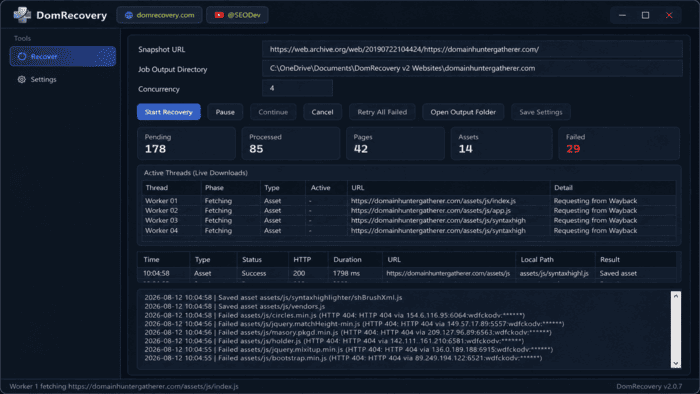
What a recovery run looks like
Point it at the version of the site you want back. DomRecovery then follows the links, fetches the pages and their assets across several workers at once, and rebuilds the folder structure as it goes. Press play to watch the shape of a run.
8 workers
An illustration of the workflow using an invented example site, not a real recovery.
Local output
Open it in a browser. Click around. Decide what stays.
The honest answer
Worth knowing before you start, because it decides whether a recovery is the right idea at all. For a content site the answer is usually yes. For a shop or a forum it usually is not.
Before anything else
Finding a site in an archive tells you it existed. It tells you nothing about who owns the words, the photographs, the logo or the code, and it grants you no permission at all. Copyright does not lapse because a domain did.
Handled properly this is straightforward, and it is the difference between a restoration and a problem. If you are not sure where you stand, that is worth resolving first.
It comes with Pro
DomRecovery is included with DHG Pro rather than sold separately, which matters because recovery rarely stands on its own. The same subscription finds the names worth rebuilding, tells you whether the history suits your plan, and then puts the site back together.
Prefer to read first? The written recovery guide walks through planning an archive-led rebuild end to end.
The route
The software handles the middle. The decisions at either end, whether you may and what should return, stay with you, which is exactly where they belong.
Read the written guideOwnership, a licence, or another sound basis. This is genuinely step one, not a box to tick afterwards, because everything downstream depends on it.
A site has many snapshots and they are not equal. Choose the capture that best represents the version you actually want back.
The job runs and hands you a browsable local copy. Click through it like a visitor would. Gaps and oddities show up quickly that way.
Cut what should not return, update what has dated, and put only the approved result through your normal deployment.
See it properly
A short walkthrough of the 2026 release: choosing a snapshot, running the job, and opening the recovered project locally to see what actually came back.
Watch on YouTubeWho does this
The backup that turned out not to be running, the host that closed, the migration that went wrong. This is the common one, and the least complicated.
You acquired a domain with history. Seeing the site as it was tells you far more than a metrics panel about whether that history suits your plan.
Guides and documentation that people still search for and still need, brought back where you hold the rights to do it.
A recovered structure is a far better starting point than an empty folder, provided you treat it as a draft rather than a finished site.
Part of one research suite
A rebuild is what happens after you have found a name worth rebuilding and checked that it suits the plan. These are the tools either side of it, all included with DHG Pro.
 Archive recovery
DomRecovery
The dedicated product site, with current release information and the recovery workflow in more detail.
Visit DomRecovery
Archive recovery
DomRecovery
The dedicated product site, with current release information and the recovery workflow in more detail.
Visit DomRecovery
 Find it first
Expired Domain Hunter
Crawl for expired names with genuine history, which is where most recovery projects actually begin.
Explore Expired Domain Hunter
Find it first
Expired Domain Hunter
Crawl for expired names with genuine history, which is where most recovery projects actually begin.
Explore Expired Domain Hunter
 Search the market
Easy Expired Domains
Search auction, closeout, BIN, expiring and expired inventory from thirteen providers in one place.
Explore Easy Expired Domains
Search the market
Easy Expired Domains
Search auction, closeout, BIN, expiring and expired inventory from thirteen providers in one place.
Explore Easy Expired Domains
 Check before you commit
DomDetailer
Quality and backlink context on a name, using the credit allocation included with DHG Pro.
Explore DomDetailer
Check before you commit
DomDetailer
Quality and backlink context on a name, using the credit allocation included with DHG Pro.
Explore DomDetailer
Reasonable questions
Including the two that matter most: what actually comes back, and whether you are allowed to use it.
No, and be wary of anything that claims otherwise. Archive coverage is uneven and a snapshot never contains a database, a login area or any server-side code. What you get back is the captured pages, structure and assets, which for a content site is usually most of what mattered.
No. An archive is a historical record. It transfers no copyright, no trademark, no ownership and no clearance for personal data. Publishing recovered material without a right to use it is an infringement whether or not the original site is still online.
You recover how they looked, not how they worked. Anything that talked to a server needs rebuilding for real. That is normal, and often a good moment to replace something dated rather than restore it.
DomRecovery is included with Domain Hunter Gatherer Pro, alongside the discovery tools, Easy Expired Domains and the Pro DomDetailer credit allocation.
No. The console above is an illustration of the workflow using a made-up example site, so you can see the shape of a recovery run before installing anything. The counts and the file names are invented.
Still out there
DomRecovery comes with DHG Pro, alongside the discovery tools that find the names worth recovering in the first place.
DHG Pro costs $97 per month or $679 per year, billed in US dollars. These are suite subscription prices; the feature is included with the relevant plan.
Compare plan features, billing options and the Pro Lifetime licence before choosing.
Choose a snapshot and review the recovered material with our guide to planning an archive-led website rebuild.
Decide what to build next with our guide to practical uses for expired domains.